
Starting a Discussion
A topic starts a conversation in one category. You can post it as an open discussion or as a question.
You must be signed in to start a discussion. Members who are banned can’t post.
-
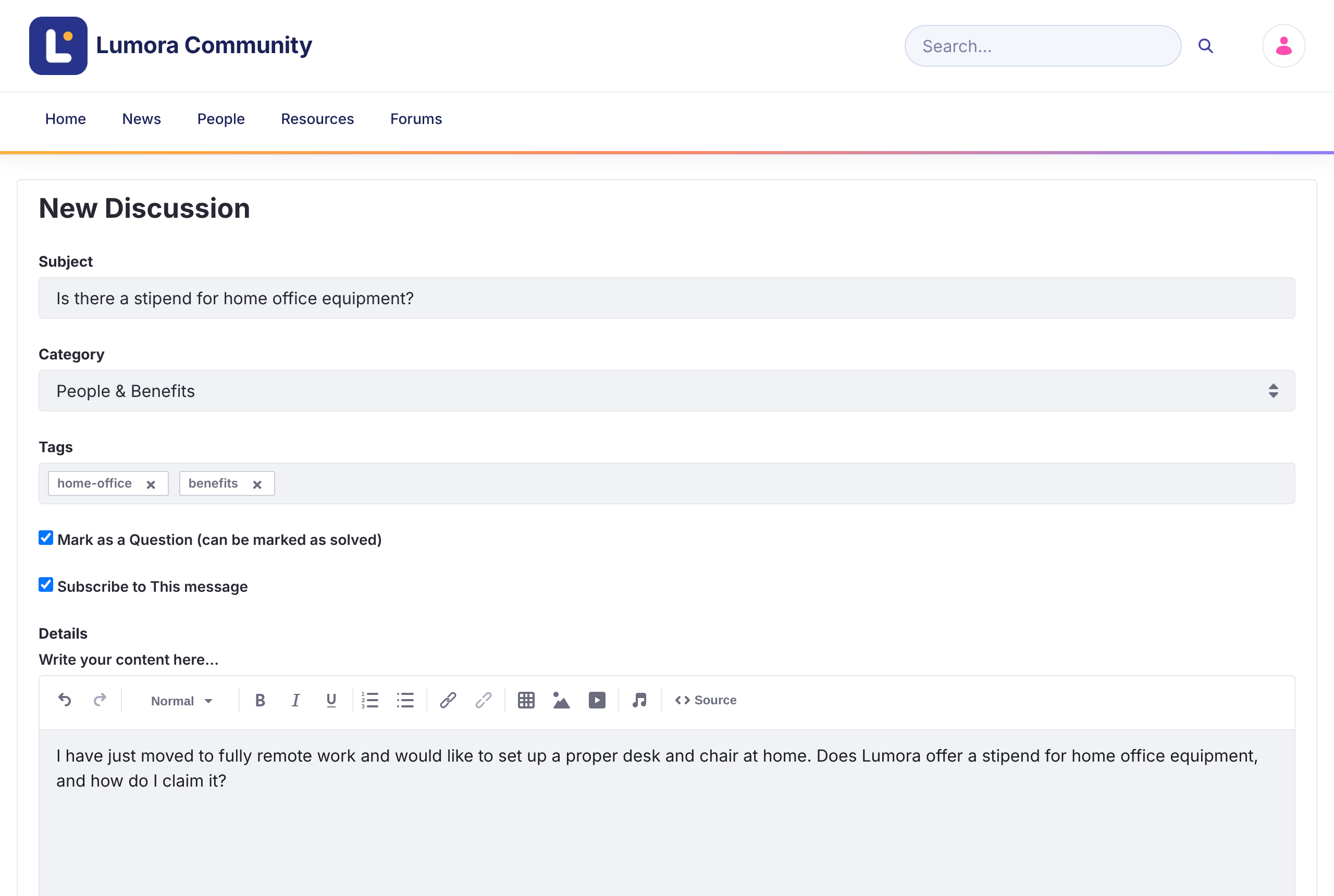
Click New Discussion on the home page or above the discussions list.
-
Enter a Subject that describes the topic.
-
Select a Category.
-
Optionally, add Tags to help others find the topic.
-
Leave Mark as a Question (can be marked as solved) checked if you’re asking for help. Clear it for an open discussion. You can change this later.
-
Leave Subscribe to This message checked to get notified about replies.
-
Write the topic in Details. You can format text, add links, tables, images, and video, and mention other members.
-
Optionally, click Attach Files. Each file can be up to 10 MB.
-
Click Post.
The topic opens when it’s posted.
Moderators also see a Priority field: Announcement, Sticky, or Urgent. See Pinning Topics with Priority.
Editing or Deleting Your Topic
Open the topic’s Options menu (⋮) and click Edit Topic or Delete Topic. From the same menu, Convert to Question and Convert to Discussion switch between the two kinds of topic.
Converting a question to a discussion removes its accepted answer.